Network Port Checker
Understand open ports, identify network services, and troubleshoot connectivity.
Common Network Ports
HTTP (80), HTTPS (443), SSH (22), MySQL (3306)
Network Monitoring Dashboard
Monitor your system security and network health
Network Status
Displays the current connection status of your network to help you monitor connectivity and availability.
VALUE
Connected
Download Speed
Measures the rate at which data is received from the internet, helping you evaluate network download performance.
VALUE
85 Mbps
Upload Speed
Measures the rate at which data is sent from your device to the internet to assess outgoing network performance.
VALUE
24 Mbps
Connected Devices
Shows the number of devices connected to the network to help you understand network usage and device activity.
VALUE
12 Devices
Open Port Analysis
Understand open ports and identify services accessible over your network.
Security Best Practices
Keep only required ports open and review firewall rules regularly.
Common Port Reference
Learn about SSH, HTTP, HTTPS, DNS and other common network ports.
Server Protection Tips
Review access permissions, update services and monitor exposed ports.
Understanding Open Ports Scanner and Network Vulnerabilities
Network ports scanner serve as communication endpoints for your operating system and internet applications. Every time your computer connects to a web service, streams a video, or receives an email, it routes data packets through designated digital channels known as port numbers. There are a total of 65,535 available network ports, categorized into standard ranges Our free online port scanner provides real-time insights into your network's open ports.:
-
Well-Known Ports Scanner (0 to 1023): Reserved for core system processes and fundamental internet protocols such as HTTP (Port 80), HTTPS (Port 443), FTP (Port 21), and SSH (Port 22).
-
Registered Ports Scanner (1024 to 49151): Assigned by IANA for specific vendor services, database applications, and software applications like MySQL (Port 3306) or RDP (Port 3389).
-
Dynamic / Private Ports Scanner(49152 to 65535): Temporarily allocated for private client-side communication sessions.
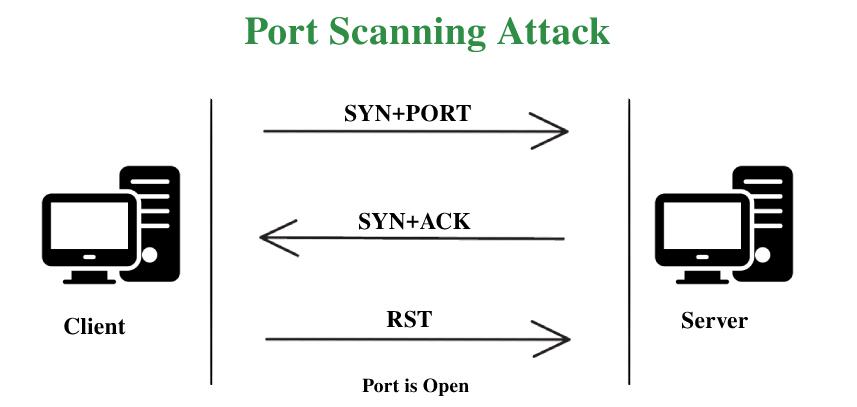
While open ports scanner are essential for establishing active connections, exposed or misconfigured open ports present a significant security vulnerability. Using an enterprise-grade port scanner helps prevent unauthorized access to sensitive server ports. Cybercriminals routinely deploy automated port scanners to scan public IP addresses for vulnerable network doors. Once an open port with an unpatched service is identified, unauthorized entry or malicious exploit payloads can be delivered. Using an enterprise-grade port scanner helps prevent unauthorized access to sensitive server ports. Conducting routine security audits with a reliable online port scanner allows network administrators to patch vulnerabilities before exploitation occurs.
Commonly Scanned Ports and Their Security Risks
When conducting a port scanner diagnostic test, it is crucial to understand which common ports should remain open and which should be strictly closed or protected behind a firewall Running a routine diagnostic with this port scanner ensures that vulnerable management ports remain blocked:
-
Port 21 (FTP - File Transfer Protocol): Used for transferring files between hosts. Unencrypted FTP transmits credentials in plain text. It is strongly advised to disable FTP in favor of SFTP or FTPS.
-
Port 22 (SSH - Secure Shell): Essential for secure remote server management. While encrypted, open SSH ports are frequent targets for brute-force login attacks. Administrators should enforce key-based authentication and change the default port number.
-
Port 80 & 443 (HTTP & HTTPS): Standard web service communication ports. Port 80 handles unencrypted web traffic, whereas Port 443 establishes SSL/TLS encrypted web sessions.
-
Port 3389 (RDP - Remote Desktop Protocol): Allows remote desktop control of Windows systems. Leaving Port 3389 open to the public internet poses severe security risks and can lead to unauthorized system access.
### Best Practices for Securing Open Network Ports
Regularly auditing your network infrastructure with an online port scanner is only the first step toward building a robust cybersecurity defense. Once you identify open ports, implementing strict security policies is necessary to prevent potential exploits A modern web-based port scanner eliminates the need to install complex local terminal software..
Here are four essential strategies for securing exposed network ports:
1. **Implement Firewall Filtering Rules:** Configure both hardware firewalls and host-based firewalls (such as Windows Defender Firewall or UFW on Linux) to restrict inbound traffic. Before launching new services, always test your public IP address using our port scanner tool. Only allow whitelisted IP addresses to connect to critical management ports like SSH (Port 22) or RDP (Port 3389).
2. **Use a Virtual Private Network (VPN):** Instead of exposing administration ports directly to the public internet, require remote employees and system administrators to connect through an encrypted VPN tunnel before accessing internal server ports.
3. **Disable Unused System Services:** Every active service on your system listens on a specific port. Network security experts recommend using a reliable port scanner to maintain proper port hygiene. Conduct routine audits to identify and disable unnecessary background services, software, and daemon processes that are no longer required.
4. **Change Default Service Port Numbers:** Automated cyberattacks typically target standard default ports (e.g., SSH on Port 22). Changing these default service ports to non-standard, higher-range numbers significantly reduces automated scanning attempts In conclusion, incorporating a free port scanner into your security routine protects against automated cyber threats.
How It Works
1. Enter Target
Enter the hostname or IP address you want to check.
2. Enter Port
Enter a TCP port number such as 80, 443 or 8080.
3. Check Status
The scanner displays the port status when scanning functionality is connected.
1.Is a free SSL certificate safe for my website?
Yes. A valid SSL certificate can encrypt connections between your website and visitors, just like a paid certificate that uses comparable encryption.
2. How can I get a SSL certificate?
You can obtain a free SSL certificate through providers such as Let's Encrypt or through a hosting provider that supports free SSL.
3. How long does a free SSL certificate last?
Let's Encrypt certificates are typically valid for 90 days and should be renewed automatically before expiry.
4. Can I install a free SSL certificate on WordPress?
Yes. You can enable SSL through your hosting control panel or install a supported certificate and configure WordPress to use HTTPS.
5. What is the difference between free SSL and paid SSL?
Both can provide HTTPS encryption. Paid certificates may include additional support, warranties, or validation options depending on the provider.
6. Why is my website still showing Not Secure after installing SSL?
Check that HTTPS is configured correctly, the certificate is valid, and the site does not load insecure HTTP resources.
7. Do SSL certificates affect SEO rankings?.
Yes, Google officially considers HTTPS as a ranking signal. Installing a free SSL certificate helps improve your search engine rankings and builds trust with site visitors.
8. Is a SSL certificate safe for online transactions?
Yes, SSL certificates offer the exact same 256-bit encryption level as paid certificates. They ensure that all data transmitted between users and your website remains private and secure.
9. What is DNS propagation time?
DNS propagation usually takes anywhere from a few minutes up to 24-48 hours depending on TTL (Time to Live) settings and ISPs.
10. Why should I check my DNS Checker records?
Checking DNS records ensures that your domain points to the correct server IP, emails are routed properly, and SSL/security settings are active.
11. How long does DNS propagation Checker take?
Normally it takes between 24 to 48 hours for global DNS records to fully update worldwide.
12. Why do I see different IP addresses in different countries?
This happens during DNS propagation when some ISP servers have cached old IP records while others have fetched the updated DNS data.
13.How can I flush my local DNS Checker cache?
On Windows, open Command Prompt and type ipconfig /flushdns. On Mac, use sudo dscacheutil -flushcache.
14.What is an Online Port Scanner tool used for?
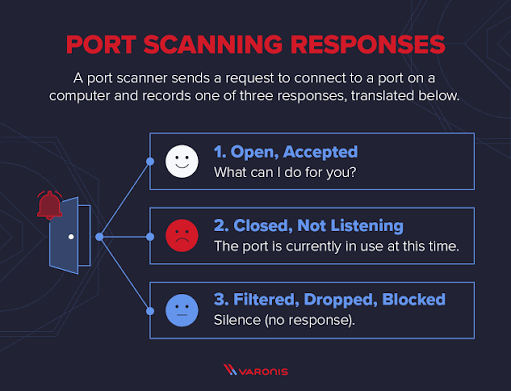
An online port scanner checks your external public IP address or hostname to determine whether specific communication ports are open, closed, or filtered by a firewall.
15.Is scanning my own network ports scanner legal?
Yes, scanning your own personal or enterprise public IP address and infrastructure to evaluate cybersecurity posture is completely legal and recommended as part of network security hygiene.
16.How do I close an unwanted open port on my computer or router?
To close an unwanted port, stop or uninstall the service bound to that specific port number, or configure your operating system firewall (Windows Firewall / UFW) and router firewall rules to block inbound traffic on that port.