
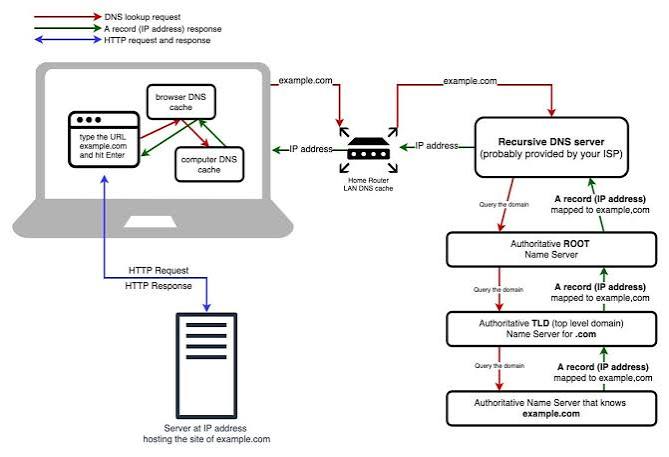
Understanding DNS Propagation Checker and Why It Takes Time
DNS propagation Checker is the timeframe required for Domain Name System (DNS) changes to take effect across the entire internet. When you update DNS checker records—such as modifying your A record to point to a new web server or changing your NS (Name Server) records during host migration—these updates do not reflect instantly for every internet user worldwide.
There are several technical reasons why DNS propagation checker requires anywhere from a few minutes up to 48 hours:
-
Time to Live (TTL) Settings: Every DNS record contains a TTL value, which tells Internet Service Providers (ISPs) and local recursive DNS servers how long they should cache the record before querying the authoritative name server again. If your TTL was set to 86400 seconds (24 hours), ISPs will store the old IP address for a full day before fetching your new IP address.
-
ISP Caching Policies: Some Internet Service Providers ignore low TTL values and refresh their DNS cache according to their own internal schedules to reduce external bandwidth usage.
-
Registry and TLD Server Updates: When changing primary Name Servers for a domain, changes must first propagate to the Top-Level Domain (TLD) root servers (such as .com or .net registries), which inherently takes longer.
How to Clear Local DNS Cache
Even after global DNS propagation checker completes, your local computer, router, or web browser might still store outdated DNS records. To verify if a DNS update is working locally, you should clear your local DNS cache using these platform-specific commands:
Clearing DNS Cache on Windows
Open the Start Menu and search for Command Prompt (cmd).
Right-click and choose Run as Administrator.
Type the following command and press Enter:ipconfig /flushdns
You will see a confirmation message stating: "Successfully flushed the DNS Resolver Cache."
Clearing DNS Cache on macOS
Open Terminal from Applications > Utilities.
Enter the following command depending on your macOS version:sudo dscacheutil -flushcache; sudo killall -HUP mDNSResponder
Press Enter and enter your administrator password when prompted.
Clearing DNS Cache in Google Chrome
Open Google Chrome and type chrome://net-internals/#dns in the address bar.
Click the Clear host cache button to remove all stored domain lookup entries.
What is DNS?
The Domain Name System (DNS) is the system thattranslates human-readable domain names into information that computers use to locate services on the internet.
What is a DNS Checker and How Does It Work?
DNS Propagation: It takes 24 to 48 days for all DNS checker records (A, CNAME, MX) to be updated on all DNS servers worldwide.
Global Server Query: DNS Checker tool can check the current DNS checker records of your domain (USA, Europe, Asia).
What is a DNS Checker?
A DNS checker helps you view and understand the DNS records associated with a domain. It can be useful when troubleshooting websites, email delivery and DNS changes.
Types of DNS Checker Records You Can Check
A Record
An A Record associates a domain name with an IPv4 address. When a visitor types the domain name into a browser, this record helps find the IPv4 address of the website's server Connects to a domain name and an IPV4 address.
.
sExample: example.com → 192.0.2.1
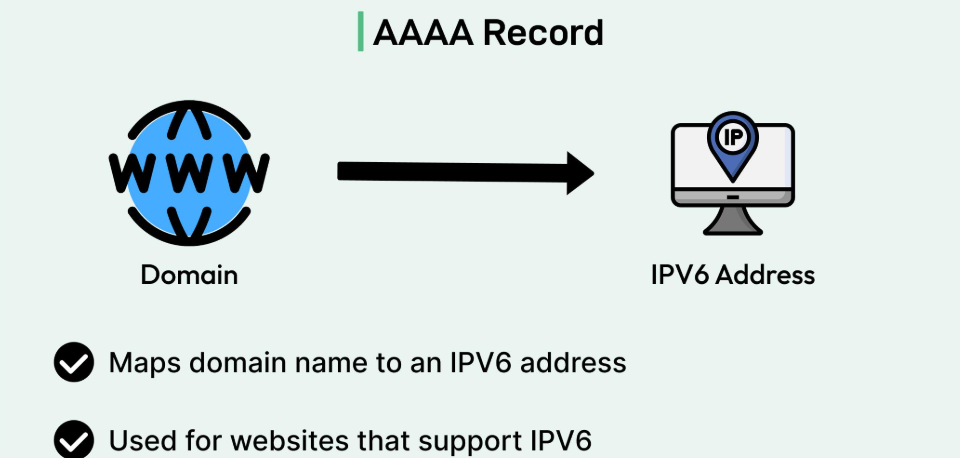
AAAA Record
The AAAA Record associates a domain name with an IPv6 address. IPv6 is designed for a larger address space and helps identify devices and servers on the internet Connects to the domain name and IPV6 address.
Example: example.com → 2001:db8::1

CNAME Record
A CNAME Record points a domain or subdomain to another domain name. It is useful for linking different names to a single main hostname. It does not directly assign an IP address Redirects one domain/subdomain to another domain (alien).
Example: www.example.com → example.com

MX Record
The MX Record determines which mail server to send incoming emails to for a domain. It also has a priority value, which helps in choosing the mail server Provides information about email delivery servers.
Example: example.com → mail.example.com

NS Record
NS Record shows which authoritative name servers are responsible for the domain's DNS records. These servers answer DNS queries for the domain Shows the authoritative DNS servers for your domain.
Example: example.com → ns1.example.net
TXT Record
TXT Record associates text information with a domain. It is used for domain ownership verification, email security, and email authentication settings such as SPF, DKIM, and DMARC Used for email authentication and domain ownership verification.
Example: SPF policy specifies authorized email servers.
DNS Propagation
When you change a DNS record, the updated information
may not appear everywhere immediately. DNS resolvers
can cache records based on their configured TTL.
💡 Tip
DNS changes can take time to become visible because
different DNS resolvers may have cached earlier values.
What is TTL?
TTL, or Time To Live, determines how long DNS information
can be cached before a resolver checks for an updated record.
TTL
300 seconds
Why Should You Check DNS Propagation Regularly?
Website Migration: Website is hosted on a server that has been shifted to check the status.
Email Delivery Issues: Email bounces are not uncommon and MX and SPF records are checked and verified.
Downtime Prevention: DNS misconfiguration can lead to website down and monitoring.
In summary, performing regular domain lookups with a reliable DNS checker is an essential practice for website owners, web developers, and system administrators alike. Whether you are migrating your website to a new hosting provider, updating mail server records, or troubleshooting unexpected downtime, a global DNS checker ensures that your DNS propagation is progressing smoothly across all geographic regions. By staying proactive and monitoring your domain's health, you can guarantee optimal uptime, secure email deliverability, and a seamless online experience for your global audience.
Frequently Asked Questions
1.Is a free SSL certificate safe for my website?
Yes. A valid SSL certificate can encrypt connections between your website and visitors, just like a paid certificate that uses comparable encryption.
2. How can I get a SSL certificate?
You can obtain a free SSL certificate through providers such as Let's Encrypt or through a hosting provider that supports free SSL.
3. How long does a free SSL certificate last?
Let's Encrypt certificates are typically valid for 90 days and should be renewed automatically before expiry.
4. Can I install a free SSL certificate on WordPress?
Yes. You can enable SSL through your hosting control panel or install a supported certificate and configure WordPress to use HTTPS.
5. What is the difference between free SSL and paid SSL?
Both can provide HTTPS encryption. Paid certificates may include additional support, warranties, or validation options depending on the provider.
6. Why is my website still showing Not Secure after installing SSL?
Check that HTTPS is configured correctly, the certificate is valid, and the site does not load insecure HTTP resources.
7. Do SSL certificates affect SEO rankings?.
Yes, Google officially considers HTTPS as a ranking signal. Installing a free SSL certificate helps improve your search engine rankings and builds trust with site visitors.
8. Is a SSL certificate safe for online transactions?
Yes, SSL certificates offer the exact same 256-bit encryption level as paid certificates. They ensure that all data transmitted between users and your website remains private and secure.
9. What is DNS propagation time?
DNS propagation usually takes anywhere from a few minutes up to 24-48 hours depending on TTL (Time to Live) settings and ISPs.
10. Why should I check my DNS Checker records?
Checking DNS records ensures that your domain points to the correct server IP, emails are routed properly, and SSL/security settings are active.
11. How long does DNS propagation Checker take?
Normally it takes between 24 to 48 hours for global DNS records to fully update worldwide.
12. Why do I see different IP addresses in different countries?
This happens during DNS propagation when some ISP servers have cached old IP records while others have fetched the updated DNS data.
13.How can I flush my local DNS Checker cache?
On Windows, open Command Prompt and type ipconfig /flushdns. On Mac, use sudo dscacheutil -flushcache.
14.What is an Online Port Scanner tool used for?
An online port scanner checks your external public IP address or hostname to determine whether specific communication ports are open, closed, or filtered by a firewall.
15.Is scanning my own network ports scanner legal?
Yes, scanning your own personal or enterprise public IP address and infrastructure to evaluate cybersecurity posture is completely legal and recommended as part of network security hygiene.
16.How do I close an unwanted open port on my computer or router?
To close an unwanted port, stop or uninstall the service bound to that specific port number, or configure your operating system firewall (Windows Firewall / UFW) and router firewall rules to block inbound traffic on that port.