
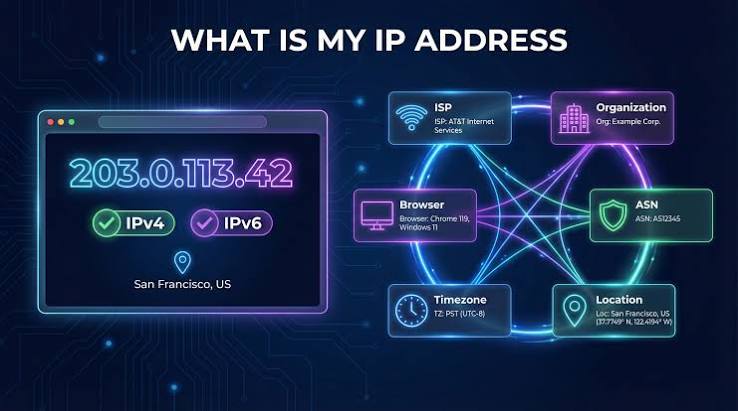
What Is My IP Address?
What Is My IP Address? ServerKaka helps you check your public IP address instantly and understand your public network information.
What Is My IP Address?
What Is My IP Address is a useful tool that helps you find your public IP address instantly. Your IP address identifies your network connection on the internet and helps websites and online services communicate with your device.
How to Check My IP Address
Visit ServerKaka's What Is My IP Address tool and open the page. Your public IP address can be displayed automatically by the tool. You can use this information to understand your network connection.
What Information Can You Find?
- Public IP Address: Identify the IP address visible to websites.
- IP Version: Learn whether your connection uses IPv4 or IPv6, when supported.
- Network Information: Check available connection details.
- Troubleshooting: Use your IP information when diagnosing network connectivity issues.
Why Is My IP Address Important?
Your IP address helps devices and servers communicate over the internet. It can be useful when configuring network settings, troubleshooting connectivity, or managing server access.
Is It Safe to Check My IP Address?
Checking your public IP address is generally safe. However, avoid sharing sensitive network details publicly, and remember that an IP address may reveal approximate location information.
Check Your IP Address with ServerKaka
Use ServerKaka's free IP lookup tool to discover your public IP address and explore your available network information quickly and conveniently.
## What is the Difference Between Public IP and Private IP Address?
Understanding the difference between a Public IP address and a Private IP address is essential for internet security and network navigation.
* **Public IP Address:** A public IP address is assigned to your network router by your Internet Service Provider (ISP). It is globally unique across the entire internet and is visible to every website and online service you visit. This address identifies your network on the web.
* **Private IP Address:** A private IP address is assigned by your home or office router to individual devices connected to the local network (such as your smartphone, laptop, or smart TV). These addresses are used for internal communication within your network and are not accessible from the public internet.
---
## Difference Between IPv4 and IPv6
As more devices connect to the internet, IP addresses have evolved into two main formats: IPv4 and IPv6.
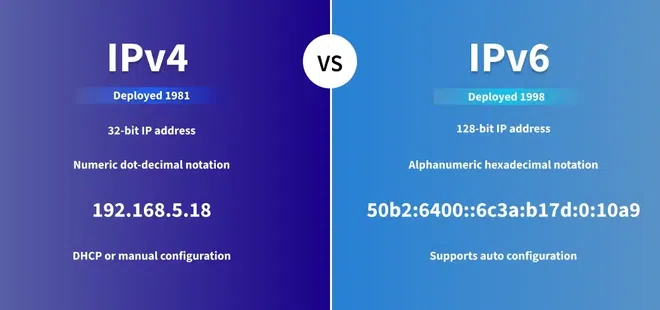
* **IPv4 (Internet Protocol Version 4):** IPv4 is the most widely used protocol. It uses a 32-bit numerical address format written as four numbers separated by periods (e.g., `192.168.1.1`). It supports roughly 4.3 billion unique addresses, which are nearly exhausted today.
* **IPv6 (Internet Protocol Version 6):** IPv6 was created to replace IPv4. It uses a 128-bit hexadecimal address format (e.g., `2001:0db8:85a3:0000:0000:8a2e:0370:7334`). IPv6 can support trillions of unique addresses, ensuring the internet can continue to expand securely.
---
## Frequently Asked Questions (FAQs)
### 1. Can someone find my exact physical location using my IP address?No, an IP address does not reveal your exact physical street address or home location. It only provides general geographical information, such as your city, state, or country, along with your Internet Service Provider (ISP).
### 2. How can I hide or change my IP address?
You can easily hide or change your public IP address by using a Virtual Private Network (VPN), a Proxy Server, or the Tor Browser. Using a VPN encrypts your internet connection and routes your traffic through a remote server.
If you want to check What is My IP Address, our free tool helps you find your public IP address instantly.
Public IP
Your public IP address is the address
visible to websites and online services.
IPv4 / IPv6
Check whether your network is using
IPv4 or IPv6 connectivity.
Network Information
Use your IP information for network
troubleshooting and configuration.
What Is an IP Address?
An IP address is a unique address used to identify a device or network connection on the internet. Your public IP address allows internet services to communicate with your network.
Public IP
Your public IP is the address visible to websites and online services..
Network
Check the network connection currently being used to access the internet.
Connection
Use your IP information for troubleshooting, firewall configuration and remote access
IPv4 vs IPv6
IP addresses are available in two main versions: IPv4 and IPv6. Both are used to identify devices and communicate across networks.
IPv4
IPv4 uses a 32-bit address format and is still widely used for internet communication.
IPv6
IPv6 uses a 128-bit address format and provides a much larger address space.
Why Check My IP Address?
Checking your public IP address can help you understand your network connection, troubleshoot connectivity issues, and configure servers or security settings.
1. Network Troubleshooting
Quickly identify your public IP when troubleshooting network connectivity.
2. Server Configuration
Use my IP address when configuring servers, firewalls, and remote access.
3. Security Checks
Check the public IP associated with your current internet connection.
4. Remote Access
Use your public IP when setting up secure remote connections.
How to Find What is My IP Address on Windows and Mac”
-
Windows: Open Command Prompt (
cmd) $\rightarrow$ typeipconfig$\rightarrow$ press Enter. -
Mac: Go to System Settings $\rightarrow$ Network $\rightarrow$ Wi-Fi/Ethernet details.
- Android / iPhone: Go to Settings $\rightarrow$ Wi-Fi $\rightarrow$ Tap connected network details.
How VPNs Change What is My IP Address Location”
1. VPN (Virtual Private Network):By using VPN, your real IP address is hidden and you get a fake IP of a different country.
2.Proxy Servers: The proxy server bypasses your request through a potential router, so that your IP address is masked.
3. Tor Browser:Tor Browser can be used for anonymous browsing using encryption layers.
“Why Should You Check What is My IP Address Regularly?”
Online Location Tracking:On the Internet, your approximate location (city, state, country) and ISP name can be known.
Website Access & Content Geo-blocking:Some websites and streaming platforms (like Netflix) block or allow content based on IP location.
Network Troubleshooting:When someone comes into the network, they can be identified by their my IP address.
Cybersecurity & Privacy:Cybercriminals can use your my IP address for malicious activities or DDoS attacks.
How to Protect Your Privacy Online
-
Use HTTPS Websites: Always ensure that websites use secure HTTPS connections to protect your data packets.
-
Keep Devices Updated: Regularly update your operating system and router firmware to patch security vulnerabilities.
-
Avoid Public Wi-Fi Without Protection: Public networks in cafes or airports can expose your network traffic; always enable a VPN before connecting.
- Use Ad-Blockers and Anti-Tracking Extensions: Browser extensions can prevent third-party scripts from logging your IP address and online activity.
Frequently Asked Questions
Learn more about IP addresses, public IPs, IPv4, IPv6, and how your internet connection is identified.
What is my public IP address?
My public IP address is the address that identifies your internet connection to websites and other internet services. The IP shown on this page is detected from your current connection.
Is my IP address always the same?
Not necessarily. Many internet connections use dynamic IP addresses, which can change over time. A static IP address is designed to remain the same.
What is the difference between IPv4 and IPv6?
IPv4 uses a 32-bit address format, while IPv6 uses a 128-bit address format. IPv6 provides a much larger address space than IPv4.
Can I hide my IP address?
Services such as VPNs and proxy servers can change the public IP address that websites see. The address displayed by an IP-checking service may therefore belong to the VPN or proxy rather than your local connection.
Why do I need to know my IP address?
Your IP address can be useful for network troubleshooting, server configuration, firewall rules, remote access, and understanding how your connection appears on the internet.
Can someone trace my physical address from my IP address?
No, an IP address cannot reveal your exact physical home address. It only shows your general location, such as your city, region, or Internet Service Provider (ISP) details.
Is a Public IP Address safe to share?
Sharing your public IP address carries minor risks, such as targeted DDoS attacks or geo-tracking. It is always recommended to use a VPN to hide your IP address when using public Wi-Fi networks.
Does restarting my router change my IP address?
Yes, if your Internet Service Provider assigns dynamic IP addresses, restarting or power-cycling your router will usually assign a new IP address to your network.